Ransomware doesn't discriminate. It targets backup repositories with the same aggression as primary systems. When backups are compromised, recovery becomes a negotiation rather than a straightforward procedure.
Cloud storage with proper immutability controls isn't optional anymore; it's the line between a recoverable incident and a catastrophic one. Stornox was built with that reality in mind.
Why Ransomware Targets Your Backups First
Modern ransomware operators understand infrastructure. Before triggering encryption, many strains spend days or weeks in reconnaissance, specifically identifying and targeting backup systems. Destroying recovery paths maximizes their leverage. If you can restore from backup, the ransom loses its power.
This is why the conversation around cloud storage has moved beyond capacity and cost to something more fundamental, which is write protection at the infrastructure level.
What Object Lock Actually Does in Cloud Storage
Object Lock is a storage-layer control that prevents objects from being deleted or overwritten for a defined period. It operates independently of application-level permissions, IAM policies, or administrative credentials, which is the entire point.
Think of it as physical writing protection on a tape, but enforced by the storage platform itself. Even a compromised account with full administrative privileges cannot delete a locked object before its retention period expires. There's no override key held by the tenant. That immutability is real, not cosmetic.
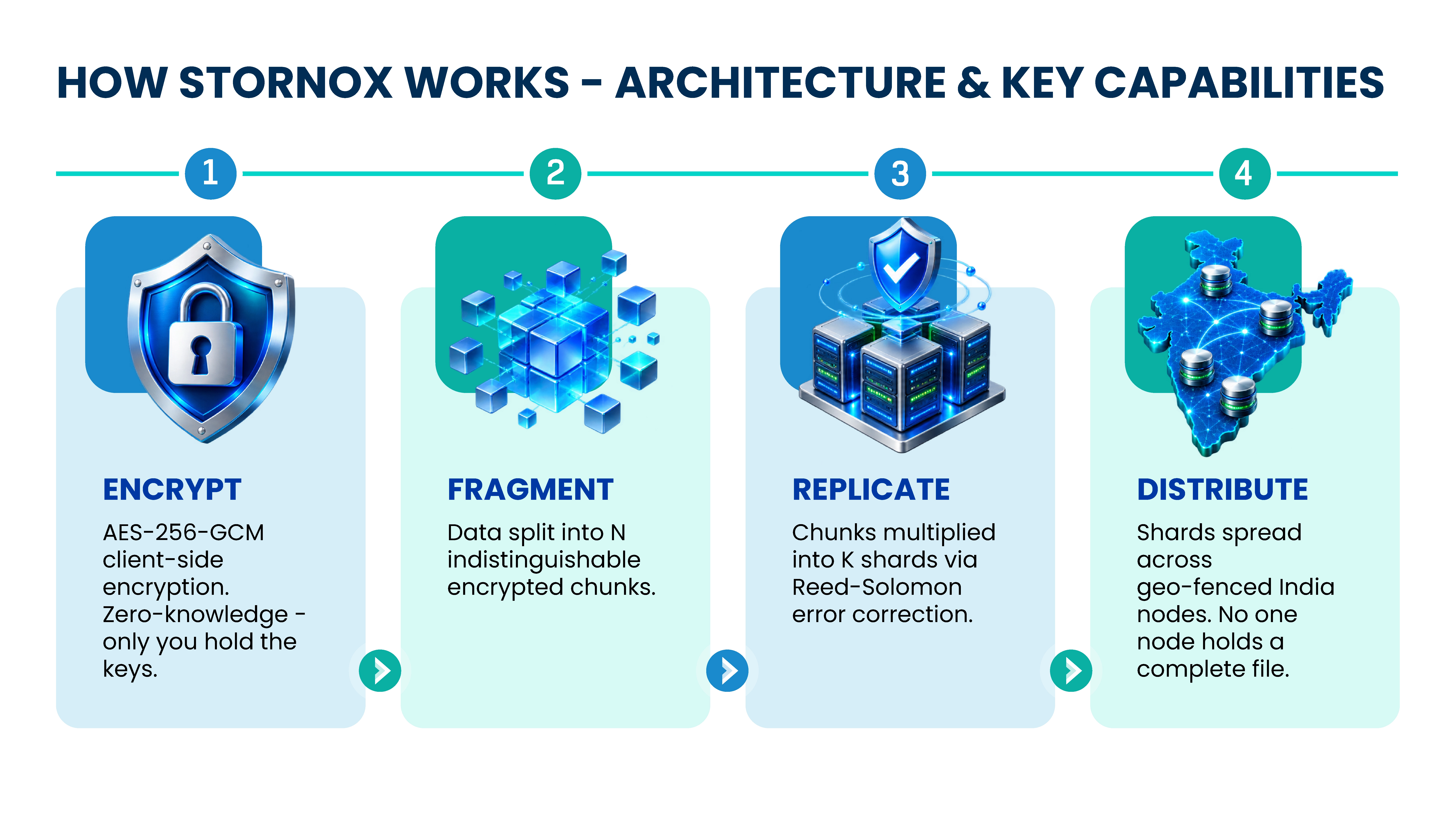
Stornox adds another layer of protection through its four step data architecture. Data is first encrypted using AES 256 GCM with client controlled keys. It is then fragmented into encrypted chunks and replicated using Reed Solomon error correction for data resilience. These shards are distributed across geo fenced nodes in India, ensuring that no single node stores the complete file.
Stornox implements Object Lock through an S3-compatible API, so it integrates natively with backup platforms such as Veeam, Nakivo, Synology, QNAP, Rclone, AWS CLI, Rubrik, and Commvault without custom connectors. A backup job that writes to a Stornox bucket with Object Lock enabled creates an immutable restore point automatically.
Object Lock also plays an important role in meeting regulatory requirements. Cloud storage that offers verified immutability gives compliance teams documentary evidence, not just assertions.
Versioning: The Layer Beneath the Lock
Versioning keeps every iteration of an object, not just the current state. When ransomware encrypts a file and writes the encrypted version back to storage, the original remains available as a previous version, ready to be retrieved and restored.
Alone, versioning is insufficient. Nothing prevents a sufficiently privileged attacker from deleting all versions simultaneously. Combined with Object Lock, though, it becomes a different proposition entirely. Locked versions cannot be deleted during their retention window, regardless of how the deletion request is authenticated.
The practical implication: even if an attacker compromises both your primary environment and the credentials your backup agent uses, the locked previous versions in Stornox remain untouchable. Recovery doesn't require negotiation. It requires a restore job.
Versioning does increase storage consumption. Each object version is billed as a full object. For organizations keeping 30-day version histories on large datasets, this can meaningfully affect storage costs. Consider this when designing retention policies, not after the first billing cycle.
How Stornox Implements Both — and Why the Combination Matters
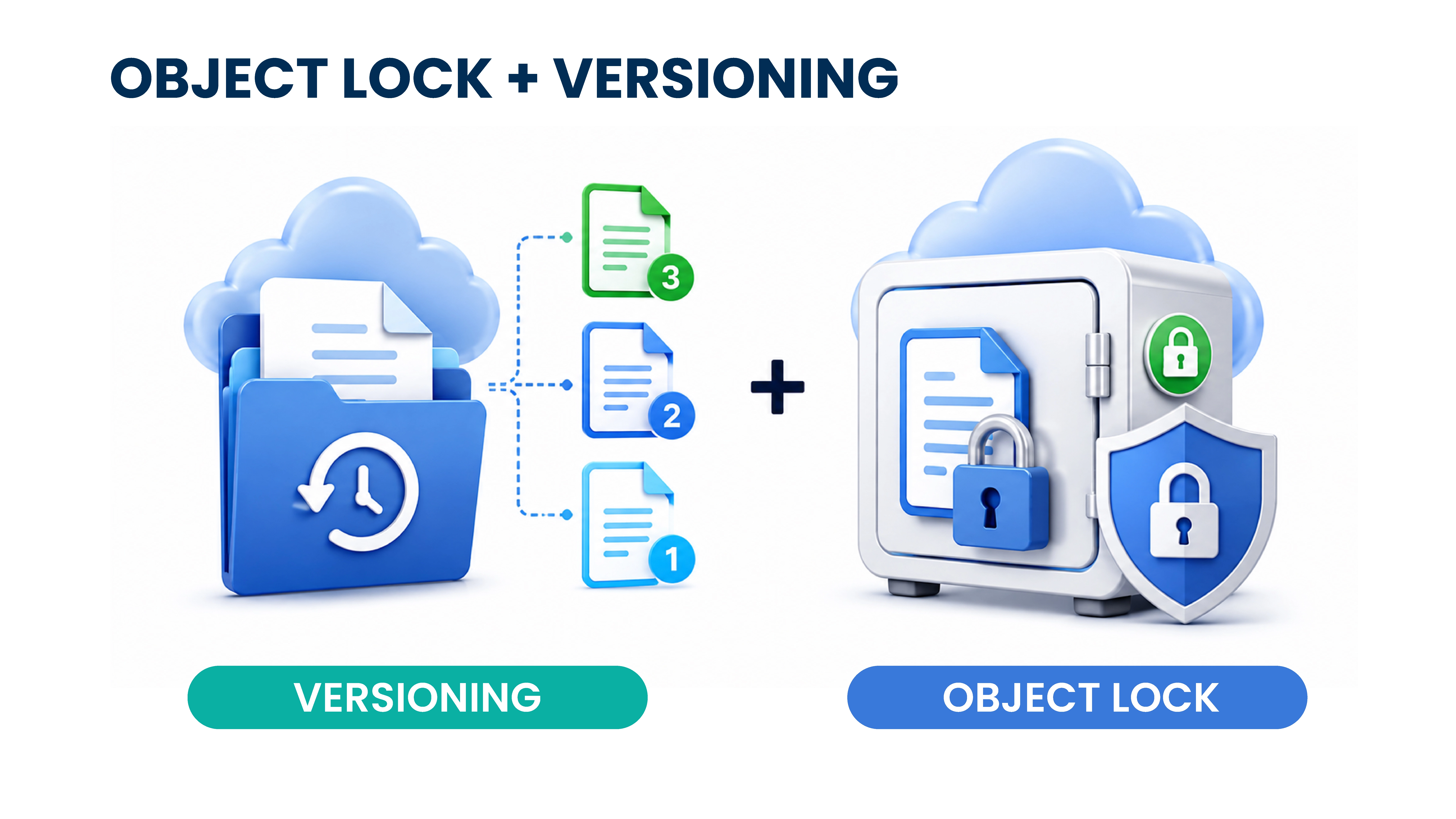 Stornox treats immutability as a first-class architectural feature, not a checkbox added to meet a feature matrix. Both Object Lock and versioning are available on all storage tiers, enabled at bucket creation, and enforced at the platform layer rather than through a middleware layer that could itself be compromised.
The configuration is deliberately simple. When you provision a bucket through the Stornox console or API, you set Object Lock mode and retention duration once. After that, every write to the bucket is automatically covered. There's no per-object tagging requirement, no scheduled job to apply retention policies, and no dependency on the backup application to behave correctly.
This matters more than most documentation makes clear. In a ransomware scenario, you need a recovery path that doesn't depend on any component that was also under attack. Stornox's enforcement sits outside the blast radius.
Compliance Modes vs. Governance Mode: Choosing the Right Policy
Object Lock in S3-compatible systems offers two behavioral modes. The right choice depends on your operational model, not just your threat model.
Compliance mode is absolute. No user, including the storage account owner, can delete or modify a locked object before its retention period ends. This is the appropriate setting for organizations with regulatory obligations such as financial services, healthcare, and legal archives. Nothing overrides it.
Governance mode allows designated privileged users to delete locked objects with explicit permission. This provides operational flexibility when a backup application writes a corrupt or test object that needs to be removed, an authorized administrator can do so without waiting for the retention period to expire.
Governance mode's flexibility can also be a weakness for ransomware protection. If an attacker compromises an account with override permissions, that protection dissolves. For organizations whose primary goal is ransomware resilience rather than regulatory compliance, Compliance mode is the correct choice.
Cost-Efficient Cloud Storage Without Sacrificing Protection
A concern that surfaces often in enterprise evaluations is whether immutable cloud storage carries a premium that makes it impractical at scale. At Stornox, the architecture is designed to deliver cost-efficient cloud storage without treating security as a feature tier.
Object Lock and versioning don't require a higher storage class or a separate product SKU at Stornox. Organizations storing multi-terabyte backup repositories can enable full immutability without stepping into an enterprise pricing tier reserved for large contracts.
Cost management matters most in the design of retention windows. Stornox's lifecycle policies automatically tier or delete expired versions after the lock period ends, keeping active storage consumption predictable. A reasonable estimate for most mid-market organizations is that properly configured lifecycle rules reduce effective storage costs by 30–40% compared to a naive "keep everything" implementation.
What IT Leaders Should Configure Before the Next Incident
Configuration decisions made before an attack determine what recovery looks like after one. A few specific recommendations based on common deployment patterns:
Start with Compliance mode on your primary backup target. Set a minimum 30-day retention window to help cover a typical ransomware dwell time before detection. Pair this with versioning enabled at the bucket level so intermediate backup versions are preserved throughout the window.
Create a dedicated Stornox bucket for backup data, separate from any general-purpose storage your applications write to. This isolates backup credentials and reduces the risk that a compromised application credential set can touch recovery infrastructure.
Finally, test restoration quarterly. Object Lock prevents deletion; it doesn't validate backup integrity. A quarterly restore drill against a Stornox-hosted backup confirms the chain that immutability, versioning, and restore fidelity are working as intended.
If you're evaluating how to strengthen your backup infrastructure against ransomware or need guidance on configuring Object Lock and versioning policies for your specific environment, contact the Stornox team to discuss your requirements. Getting the architecture right before an incident costs far less than recovering from one without it.
Frequently Asked Questions
What is Object Lock in cloud storage and how does it prevent ransomware?
Object Lock is a storage-level control that makes objects immutable, preventing them from being deleted or overwritten for a defined retention period.
Because enforcement happens at the storage platform layer, even compromised administrative credentials cannot remove locked objects. Ransomware that encrypts and re-uploads files cannot delete the clean locked versions that already exist, preserving recovery points regardless of what happens in the broader environment.
What is the difference between Compliance mode and Governance mode in Object Lock?
Compliance mode offers absolute immutability. No user, including account administrators, can delete a locked object before its retention period expires.
Governance mode allows designated users with specific permissions to delete locked objects. For ransomware protection, Compliance mode is the stronger choice because there is no privileged account that an attacker can compromise to bypass it.
Does enabling versioning significantly increase cloud storage costs?
Yes, it can increase storage costs because each version of an object is stored and billed independently.
For organizations retaining large backup datasets across long windows, this can represent a meaningful cost increase. The practical mitigation is combining versioning with lifecycle policies that automatically delete or tier versions once their Object Lock retention period has expired, which keeps long-term storage costs predictable.
Can ransomware delete locked backups if it compromises the backup application's credentials?
No. Object Lock is enforced at the cloud storage platform layer, independent of the backup application, IAM roles, or API credentials used by the backup agent.
A ransomware payload that fully compromises the backup application's service account still cannot delete objects that are within their Object Lock retention window. The protection does not depend on any software component that might be within the attacker's reach.
How long should I set the Object Lock retention window?
Most security guidance recommends a minimum of 30 days, which accounts for the typical dwell time between ransomware infection and detonation.
Organizations subject to regulatory retention requirements may need windows of 90 days to seven years depending on the applicable framework.
For mid-market IT environments, 30 to 60 days can provide a practical balance between recovery coverage and storage cost growth.
Does Stornox's Object Lock integrate with backup software like Veeam or Commvault?
Yes. Stornox provides an S3-compatible API, and backup platforms such as Veeam, Nakivo, Synology, QNAP, Rclone, AWS CLI, Rubrik, and Commvault support immutable backup repositories using the S3 Object Lock standard.
Backup jobs writing to a Stornox bucket with Object Lock enabled can create immutable restore points without requiring custom connectors or manual tagging at the individual object level.
What happens if I need to delete a test or corrupted backup object that has been locked?
In Compliance mode, you cannot delete a locked object before its retention period expires. It must expire naturally at the end of the retention period.
This is a deliberate trade-off for the strongest possible protection. In Governance mode, an authorized administrator can delete locked objects using elevated permissions.
Organizations that prioritize operational flexibility over absolute immutability may prefer Governance mode, with the understanding that it provides less ransomware resilience than Compliance mode.
Ready to Reduce Your Cloud Storage Costs?
Discover how Stornox helps enterprises simplify storage, improve performance, and avoid unpredictable data transfer costs.